
MAGIC TOOL — Turn Your Drawings into Realistic Designs Instantly
Create real interior designs from simple drawings with the MAGIC TOOL in Feel Design.ai—sketch, remix, and transform ideas instantly.
The MAGIC TOOL is one of the most powerful features inside Feel Design.ai, designed to turn imagination into reality—instantly.
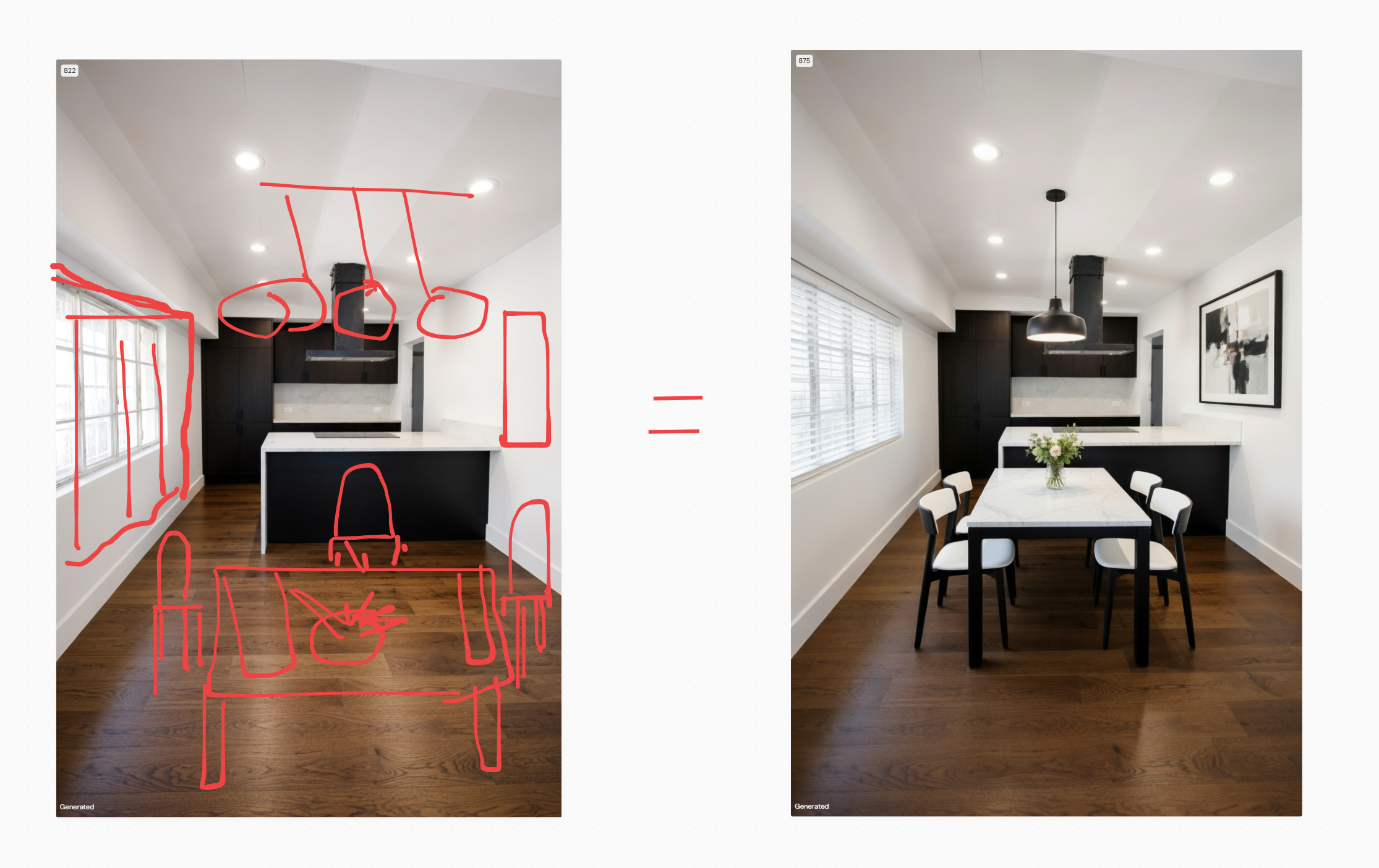
Instead of manually designing or searching for assets, you simply draw your idea directly onto your space, and the AI transforms it into a fully rendered, realistic design. Whether it’s furniture, textures, or decorative elements, your rough sketch becomes a polished visual in seconds.
🔹 Why the MAGIC TOOL Stands Out
✏️ Draw Anything — Sketch your vision freely using the pen tool
⚡ Instant Transformation — Convert drawings into realistic designs immediately
🛋️ Full Design Elements — From furniture to materials and textures
🔁 Remix with Prompts — Generate new variations using simple text input
🎯 No Complexity — No design skills or technical steps required
This tool removes the gap between idea and execution.
🔹 How It Works (Step-by-Step)
Upload Your Space
Start with an image of your room or environmentSelect the Pen Tool
Use the drawing feature to sketch directly on the imageDraw Your Vision
Outline furniture, textures, or any design idea
Click “Use Magic”
Instantly convert your drawing into a realistic design
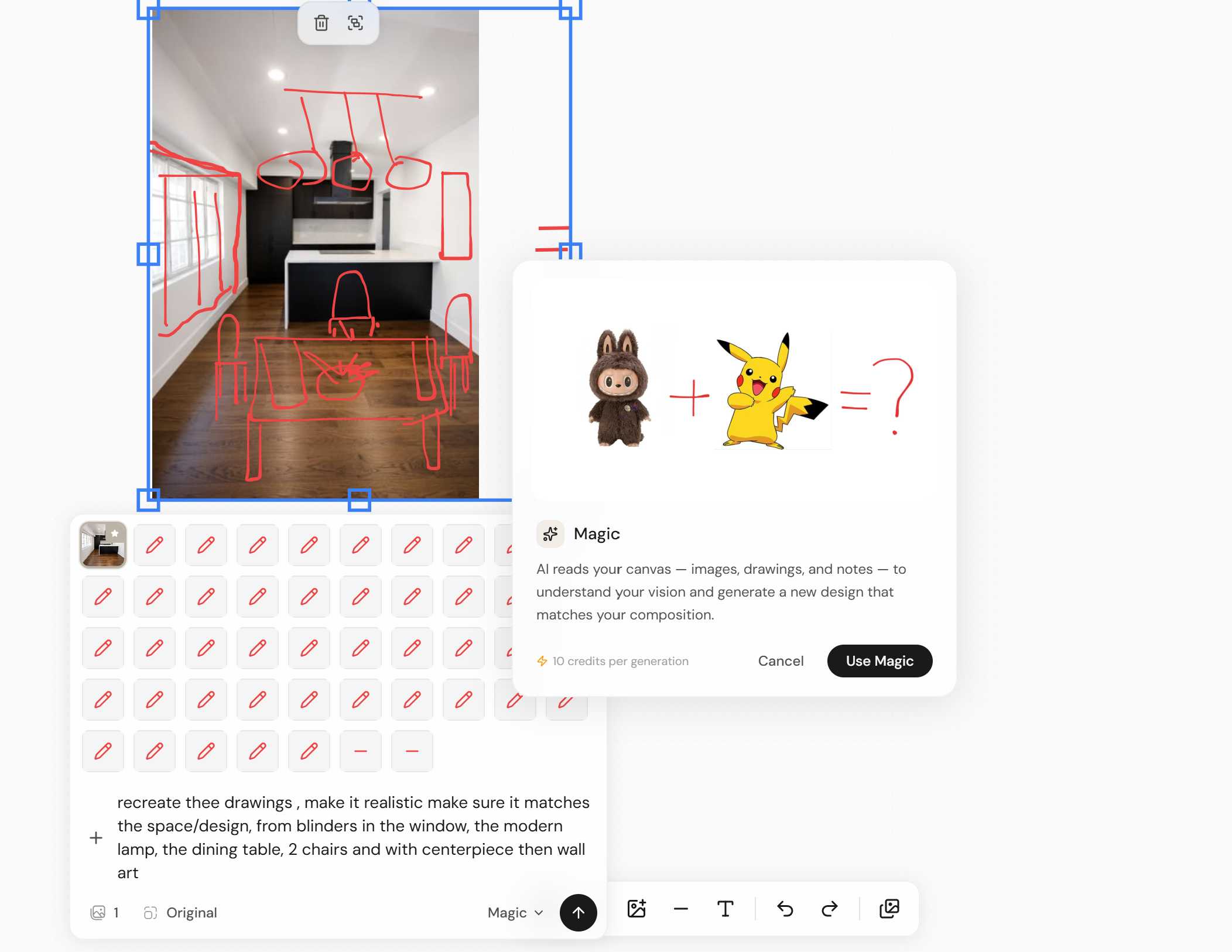
(Optional) Add a Prompt
Describe what you want (e.g., “modern sofa,” “wooden texture”Remix & Explore
Generate variations and refine your design with AI
🔹 Designed for Creative Freedom
The MAGIC TOOL gives you full creative control without limitations:
Turn a simple shape into a designer sofa
Sketch wall textures and see them come to life
Add decor elements without searching catalogs
Experiment with bold ideas risk-free
It’s like sketching your imagination—and watching it instantly materialize.
🔹 Remix Your Designs with AI
Beyond drawing, the MAGIC TOOL allows you to remix your space using prompts.
Just type your idea, click Magic, and the AI generates a transformed version of your design—aligned with your vision.
No manual editing. No complex workflows. Just instant creativity.
F.A.Q.
What is the MAGIC TOOL in Feel Design.ai?
The MAGIC TOOL is an AI-powered feature that allows users to draw directly on their space and instantly convert those drawings into realistic interior designs such as furniture, textures, and decor.
How does the MAGIC TOOL work?
Users upload an image, draw their ideas using the pen tool, and click 'Magic' to transform the drawing into a realistic design. They can also add prompts to refine or remix the results.
What can I create using the MAGIC TOOL?
You can create furniture, textures, decor elements, and other interior design features by simply drawing them onto your space.
Can I use prompts with the MAGIC TOOL?
Yes, you can enter prompts to guide the AI and remix your designs, allowing you to explore different styles and variations instantly.
Do I need design experience to use the MAGIC TOOL?
No, the tool is designed for ease of use and requires no prior design skills. Anyone can draw and generate realistic results instantly.
How fast are the results generated?
Results are generated in seconds after clicking 'Magic', making it easy to experiment and iterate quickly.